
WORDPRESS SECURITY • SEO MALWARE • HSEO • HACKED WEBSITE • WEBSITE MAINTENANCE
HSEO Malware: The Hidden WordPress Threat Silently Destroying Your Search Rankings
By Logical Web Solution · WordPress Security · 6 min read
HSEO malware is engineered to stay invisible. Most website owners only discover it after serious SEO damage has already occurred.
What Is HSEO Malware?
HSEO (Hacked SEO) is not a legitimate plugin. It is a sophisticated malware that injects spam content into search results while your website appears normal to visitors.
It creates hidden access points and only activates for search engine crawlers, making it extremely difficult to detect.
How Do Sites Get Infected?
Most infections happen due to outdated plugins, themes, or WordPress core files. Weak passwords and poor security practices make it easier for attackers to exploit known vulnerabilities.
Warning Signs
- Spam results in Google search (site:yourdomain.com)
- Unknown admin users
- Sudden ranking drops
- Unfamiliar indexed pages
- Fake ReCAPTCHA or CAPTCHA popups
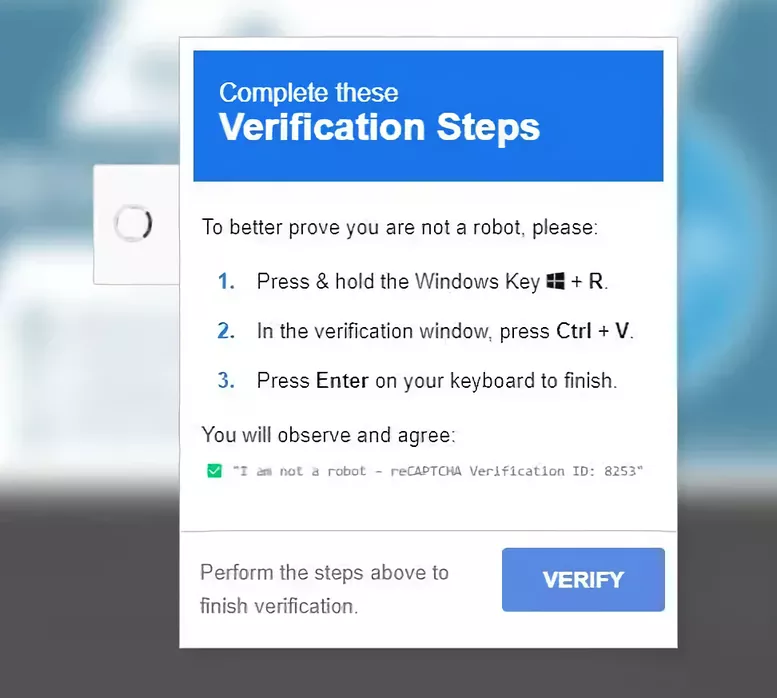
Avoid These Fake CAPTCHA Traps
According to cybersecurity research, attackers now use fake CAPTCHA prompts to trick users into downloading malware or revealing credentials.
- Do NOT click or submit anything in the fake CAPTCHA.
- Do NOT download files suggested by the popup.
- Do NOT provide your login credentials or personal information.
- Do NOT ignore the warning, thinking it’s normal site behavior.
Instead, close the page, run a full malware scan, and verify your website security with a professional.
Impact on Your Business
Your website can be de-indexed, traffic may drop drastically, and attackers can gain full control of your system. Delayed action increases both cost and recovery time.
Why It Goes Undetected
This malware only shows spam content to search engines, not users. Security tools often fail to detect it due to its hidden and obfuscated nature.
Our Response Process
How to Protect Your Website
Security requires consistent updates, strong authentication, regular scans, backups, firewall protection, and active monitoring.
We ensure every website remains secure through daily monitoring, rapid updates, and structured incident response.
Conclusion
HSEO malware is preventable with proper maintenance. Ignoring updates and security leads to higher risks and long-term losses.